Preserving an archival collection takes more than choosing the scanner with the highest advertised resolution. Print sizes, film formats, batch volume, color accuracy, software, and long-term file management all affect the quality and efficiency of a digitization project.
This roundup compares 10 scanners suited to different preservation goals, from fast photo sorting and automatic document feeding to high-resolution flatbed work for fragile prints, negatives, and oversized materials.
Best 10 Photo Scanners for Archival Collections Picks for 2026
Best High-Volume Pick

- Scans batches of up to 36 photos
- Captures photo backs with duplex scanning
- Supports 600 dpi TIFF archival files
Best For: Large collections of mixed-size prints
Best Simple Photo Feeder

- Scans 4 x 6 photos in about two seconds
- Supports photo sizes up to 8 x 10 inches
- Includes one-click image enhancement tools
Best For: Small collections of standard-size prints
Best Detail-Focused Flatbed
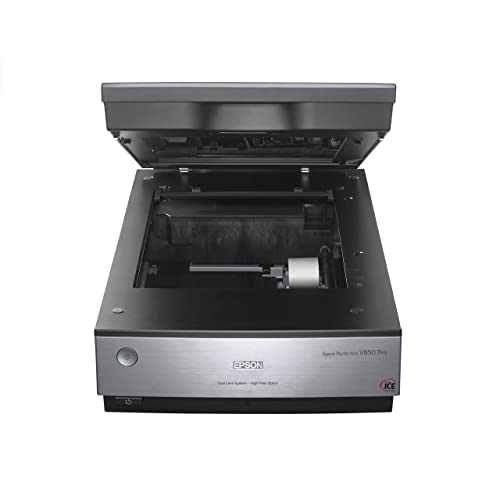
- Scans at up to 6400 dpi
- Delivers 4.0 Dmax tonal range
- Uses a dual-lens CCD system with Digital ICE
Best For: High-detail archival scans and careful originals
Best Connected Workflow

- Scans up to 100 photos per minute
- Includes three carrier sheets for delicate prints
- Offers touchscreen profiles, Wi-Fi 6, and cloud support
Best For: Connected photo and document digitization workflows
High-Fidelity Archiving
Epson Perfection V800 Photo Scanner

- 6400 dpi resolution with 4.0 Dmax
- 48-bit color and 16-bit grayscale depth
- Scans photos and slides with a Dual Lens System
Best For: Detailed photo and slide preservation
Large-Format Preservation
Epson Expression 13000XL Large-Format Scanner

- Scans reflective media up to 12.2 x 17.2 inches
- 2400 x 4800 dpi with 48-bit color depth
- Batch scanning and one-touch color restoration
Best For: Large photographs, artwork, and archival batches
Best Slim Archive Scanner

- 4800 x 4800 dpi resolution for detailed scans
- Color restore and dust-removal enhancements
- USB Type-C power and data connection
Best For: Space-conscious photo and document archiving
Best Simple Photo Restorer

- 4800 dpi optical resolution
- One-click Easy Photo Fix restoration
- Removable high-rise lid for books
Best For: Straightforward restoration of faded prints
Best Film-Capable Archive Scanner

- 6400 dpi resolution for high-detail enlargements
- Built-in unit for 35mm film, slides, and negatives
- Digital ICE reduces film dust and scratches
Best For: Mixed photo, film, and document collections
Best High-Volume Pick – FastFoto FF-680W
For large archival collections, the Epson FastFoto FF-680W combines rapid batch scanning with photo-focused enhancement tools. It can scan up to 36 photos at once, handle prints up to 8 x 10 inches, and capture both a photo and handwritten notes on its back with duplex scanning.
Best For: Families, researchers, and small archives digitizing large quantities of mixed-size prints.
Pros:
- Scans photos at up to one photo per second at 300 dpi.
- Supports 300 dpi sharing, 600 dpi TIFF archiving, and 1200 dpi enlargements.
- Includes auto enhancement, color restoration, red-eye reduction, cropping, rotation, and de-skew.
- Offers Wi-Fi, USB, OCR, and automatic backup to Dropbox and Google Drive.
Cons:
- Its 8 x 10-inch maximum photo size excludes larger artwork and prints.
- The automatic document feeder is listed with a 10-sheet capacity.
- Windows 7 is the listed minimum system requirement.
The FF-680W is a strong all-around choice for photo scanners for archival collections when throughput, flexible file formats, and preservation of notes on photo backs matter more than maximum flatbed detail.
Best Simple Photo Feeder – ePhoto Z300
The Plustek ePhoto Z300 is a straightforward choice for photo scanners for archival collections when ease of use and compact desktop scanning are priorities. It feeds prints individually, scans a 4 x 6 photo in about two seconds at 300 dpi, and supports common photo sizes through 8 x 10 inches.
Best For: Home users and small projects that need quick, uncomplicated digitization of standard-size photographs.
Pros:
- Scans 4 x 6 photos in about two seconds at 300 dpi.
- Supports 3 x 5, 4 x 6, 5 x 7, 8 x 10, letter, and A4 sizes.
- Uses a CCD sensor with optical resolution up to 600 dpi.
- Includes image enhancement tools for restoring faded photos.
Cons:
- Its single-sheet capacity requires feeding photos one at a time.
- Connectivity is USB only.
- The listed minimum system requirement is Windows 7.
The Z300 trades batch automation for a simple feed-through workflow. It is practical for organized stacks of ordinary prints, but larger archival projects may take longer because each photo must be inserted separately.
Best Detail-Focused Flatbed – Perfection V850 Pro
The Epson Perfection V850 Pro is designed for archival scanning where fine detail, tonal range, and high-resolution capture are more important than feeder speed. Its 6400 dpi resolution, 4.0 Dmax, CCD sensor, and dual-lens system support detailed scans with smooth shadow gradations.
Best For: Photographers, conservators, and serious archivists prioritizing image quality for carefully handled originals.
Pros:
- Provides 6400 dpi resolution for detailed photo scans.
- Offers a 4.0 Dmax rating for tonal range and shadow detail.
- Uses a dual-lens system to select the appropriate lens for scanning.
- Includes Digital ICE for photo-focused image processing.
Cons:
- At 20.9 pounds, it is substantially heavier than the other listed options.
- Connectivity is USB only.
- Its supplied notes emphasize flatbed photo scanning rather than high-speed batch feeding.
The V850 Pro is the specialist option in this group. Choose it when archival fidelity and control outweigh convenience, portability, or the fast throughput of an automatic feeder.
Best Connected Workflow – ScanSnap iX2500 Photo Edition
The ScanSnap iX2500 Photo Edition is built for organized, connected digitization of photo and document collections. It combines a touchscreen, automatic optimization, cloud support, Wi-Fi 6, USB-C, and an automatic feeder that holds up to 36 photos or 100 documents.
Best For: Users who want fast photo scanning with customizable profiles and direct delivery to computers, mobile devices, and cloud services.
Pros:
- Scans up to 100 photos per minute according to the supplied product notes.
- Includes three photo carrier sheets for delicate prints.
- Supports wireless or USB-C connections, including Wi-Fi 6.
- Automatically optimizes, names, and sorts scanned data.
Cons:
- The listed operating-system requirements are relatively recent, including Windows 10/11 and macOS Monterey or later.
- The product is rated at 600 dpi, with no higher archival resolution listed.
- Its automatic feeder capacity is lower for photos than for documents.
The iX2500 is a compelling workflow-oriented option among photo scanners for archival collections. It is especially useful when sorting, sharing, and cloud connectivity are central to the digitization process.
High-Fidelity Archiving – Epson Perfection V800 Photo Scanner
For photo scanners for archival collections, the Epson Perfection V800 is designed for detailed, color-critical work. Its CCD sensor, high optical resolution, 48-bit color depth, and 4.0 Dmax support smooth tonal transitions and fine shadow detail across photos and slides.
Best For: Archivists and serious photographers preserving photographs, slides, and other reflective or transparent media with an emphasis on image quality.
Pros:
- 6400 dpi resolution and a listed 9600 dpi maximum support highly detailed scans.
- 16-bit grayscale depth and 48-bit color depth help preserve tonal and color information.
- Dual Lens System selects between lenses for different scanning needs.
- Supports both photo and slide media and works with Windows and Mac systems listed in the specifications.
Cons:
- At 20.9 pounds, it is relatively heavy for a flatbed scanner.
- Its standard sheet capacity is limited to one item.
- Its advanced features may be more than needed for casual scanning.
The V800 is a strong choice when archival image quality takes priority over speed and compactness. It is especially compelling for collections that include both photographs and slides.
Efficient Batch Digitizing – Canon imageFORMULA RS40 Photo and Document Scanner
The Canon imageFORMULA RS40 is a practical option among photo scanners for archival collections when throughput matters. Its automatic feeder scans both sides of photos and documents, while bundled software provides enhancement tools such as red-eye correction and digital face smoothing.
Best For: Families, offices, and small archival projects that need to process mixed-size photos and documents quickly.
Pros:
- Automatic feeder holds up to 60 items and can scan up to 40 items per minute.
- Scans photos and documents in multiple sizes, including Polaroids, cards, receipts, and IDs.
- Bundled software includes photo enhancement, red-eye correction, and face-smoothing tools.
- Supports Windows and Mac and saves scans in formats including JPG, TIF, BMP, PNG, PDF, and PPTX.
Cons:
- Its 8-bit color and grayscale depth provide less tonal information than higher-end archival flatbeds.
- The CIS sensor and 150–600 dpi listed scanning options are oriented more toward convenience than maximum detail.
- It is a document/photo scanner rather than a dedicated slide scanner.
The RS40 stands out for convenient batch work and mixed-media handling. Choose it when efficient feeding and easy software enhancements are more important than the highest possible archival detail.
Large-Format Preservation – Epson Expression 13000XL Large-Format Scanner
The Epson Expression 13000XL is built for oversized materials that smaller photo scanners for archival collections cannot accommodate. Its flatbed accepts reflective media up to 12.2 by 17.2 inches, while CCD imaging, 48-bit color, and 2400 by 4800 dpi resolution support detailed reproduction.
Best For: Archives, studios, and institutions scanning large photographs, artwork, and other reflective originals in batches.
Pros:
- Large-format bed accommodates reflective media up to 12.2 by 17.2 inches.
- CCD technology, 48-bit color depth, and 3.8 Dmax support detailed, accurate scans.
- Easy Photo Fix provides one-touch color restoration and automatic dust removal.
- Batch scanning and included SilverFast Ai software support productive workflows.
Cons:
- At 31.5 pounds and 25.8 inches wide, it requires substantial workspace.
- Transparency scanning requires the optional unit, sold separately.
- Its listed resolution is lower than the V800’s 6400 dpi resolution.
The 13000XL is the specialist choice for oversized originals and repeatable batch workflows. Its large footprint and optional transparency accessory make it less practical for compact setups or film-focused scanning.
Best Slim Archive Scanner – Canon CanoScan LiDE 400
Canon CanoScan LiDE 400 Slim Scanner, 7.7" x 14.5" x 0.4", Document & Photo Scanner, Black
Check Price On AmazonFor photo scanners for archival collections, the Canon CanoScan LiDE 400 is a space-saving flatbed option with 4800 x 4800 dpi resolution, color restoration, and dust-removal enhancements. Its USB Type-C cable handles both data and power, while one-touch controls simplify recurring scans.
Best For: Home archivists who want a slim scanner for detailed photos, documents, and searchable multi-page PDFs.
Pros:
- 4800 x 4800 dpi resolution supports detailed photo scans.
- Color restore and dust-removal enhancements help improve older images.
- Auto Scan Mode and built-in PDF buttons streamline everyday workflows.
- USB Type-C combines data and power in one cable.
Cons:
- Its standard sheet capacity is one page.
- It connects by USB rather than wirelessly.
- Windows 7 is listed as the minimum system requirement.
The LiDE 400 is a practical choice when desk space matters and your collection mainly includes prints and documents. Its archival-friendly resolution and image-enhancement features make it versatile for routine preservation projects.
Best Simple Photo Restorer – Epson Perfection V19 II
The Epson Perfection V19 II is a compact choice among photo scanners for archival collections, offering 4800 dpi optical resolution and one-touch scanning. Easy Photo Fix can restore color to faded photos, and the removable high-rise lid accommodates books and thicker materials.
Best For: Beginners and home users restoring faded prints while scanning photos, artwork, books, and standard documents.
Pros:
- 4800 dpi optical resolution delivers clear, detailed scans.
- Easy Photo Fix restores color to faded photos with one click.
- One-touch buttons make routine scanning straightforward.
- Removable high-rise lid helps with books and thicker originals.
Cons:
- It is limited to USB connectivity.
- Its standard sheet capacity is one page.
- It does not list film or negative scanning features.
The V19 II favors ease of use over specialized film capabilities. For collections centered on paper photographs, artwork, and documents, its restoration tool and compact USB-powered design provide a convenient starting point.
Best Film-Capable Archive Scanner – Epson Perfection V550
For archival collections containing film as well as prints, the Epson Perfection V550 combines 6400 dpi optical resolution with a built-in transparency unit for 35mm slides, negatives, and film. Digital ICE helps reduce the appearance of dust and scratches on film, while Easy Photo Fix supports faded-photo restoration.
Best For: Serious home archivists digitizing mixed collections of photos, 35mm slides, negatives, film, and documents.
Pros:
- 6400 dpi optical resolution supports large enlargements up to 17 x 22 inches.
- Built-in transparency unit scans 35mm slides, negatives, and film.
- Digital ICE reduces the appearance of dust and scratches on film.
- Auto edge detection can separate multiple photos into individual files.
Cons:
- At 9.6 pounds, it is substantially heavier than the compact models here.
- Its listed dimensions require more desk space.
- It uses USB 2.0 and has a one-page standard sheet capacity.
The V550 is the strongest fit when an archive extends beyond photographic prints. Its film hardware, high resolution, restoration tools, and OCR support make it a more capable—but larger and heavier—scanning workstation.
How We Picked the Best Photo Scanners for Archival Collections
We evaluated these models by looking at the capabilities that matter most in real archival workflows: optical resolution, scan-bed size, film and negative support, color reproduction, dust and scratch correction, batch-feeding ability, connectivity, software compatibility, and ease of file organization. We also considered whether each scanner is best suited to occasional family-history projects, repeated batch work, or serious preservation of originals.
Because no single scanner excels at every task, the selection includes dedicated photo scanners, film-capable flatbeds, automatic-feed models, and large-format options. The right choice depends on the condition and variety of the materials you need to digitize.
Quick Comparison
- Best for high-volume mixed collections: Choose an automatic document and photo feeder such as the Epson FastFoto FF-680W or Canon imageFORMULA RS40.
- Best for careful film and print scanning: Consider a high-resolution flatbed with film holders and restoration tools, such as the Epson Perfection V850 Pro or V550.
- Best for quick 4-by-6-inch prints: A compact photo-focused scanner such as the Plustek ePhoto Z300 can simplify rapid sorting.
- Best for oversized originals: The Epson Expression 13000XL offers a substantially larger scanning area than standard consumer flatbeds.
- Best for occasional everyday use: Slim flatbeds such as the Canon CanoScan LiDE 400 or Epson Perfection V19 II are easier to store and operate.
Key Buying Factors for Photo Scanners for Archival Collections
Resolution and Detail
Optical resolution matters more than interpolated resolution. For standard prints, 600 dpi is often sufficient for flexible reprints, while higher resolutions are useful when enlarging small originals or capturing fine detail. Film and negatives typically benefit from a scanner designed for high-resolution transparency work.
Original Types and Sizes
Check whether the scanner supports slides, negatives, mounted film, postcards, albums, and oversized photographs. A flatbed is generally safer for delicate or irregular originals, while an automatic feeder is faster for loose, uniform prints.
Color and Restoration Features
Look for reliable color depth, consistent illumination, and software that can reduce dust, scratches, fading, and red-eye without overprocessing the image. Always keep an untouched master file before applying restoration edits.
Workflow and Connectivity
Automatic feeders, duplex scanning, wireless connectivity, batch naming, and searchable metadata can save substantial time across a large collection. Confirm operating-system support and whether the included software fits your preferred archival workflow.
File Formats and Storage
Save preservation masters as TIFF when practical, and use high-quality JPEG files for sharing or everyday access. Establish consistent filenames, embed dates or collection identifiers, and maintain at least one separate backup.
Who Should Buy Which Photo Scanners for Archival Collections?
Choose a high-speed feeder if you have thousands of loose prints and documents. Choose a film-capable flatbed if negatives, slides, and maximum image control are priorities. Choose a large-format scanner for maps, posters, scrapbook pages, or oversized photographs. Choose a compact flatbed if you scan occasionally and need a small, affordable device. For mixed collections, prioritize versatility and software support over headline resolution alone.